Running MIPS
Targeting MIPS
Higher-level languages like C, Python & Java are generally independent of any particular CPU or operating system. However, the tools that execute or compile them must target particular platforms. For C, the (almost) same source code can often be compiled for different targets, such as x86-64 Linux, x86-64 Windows, ARM64 macOS or MIPS Linux. The resulting compiled programs differ because they contain machine code for a particular CPU architecture AND must follow the conventions of the OS/ABI. This means that if your computer has a x86-64 based CPU, it cannot natively execute MIPS machine instructions.
This begs the question, if our CPU doesn't have the architecture to support MIPS, and we still want to write, compile and run code locally, how would we do so?
Cross-compilation
A compiler itself is built to run on a particular host, but it may generate output for a different target (such as Windows -> Linux), which is called cross-compilation. This is one reason why an application compiled for Windows will not necessarily run on macOS or Linux. Even when the CPU architecture is the same, the executable may depend on a different operating-system ABI, system libraries, APIs, or executable format. Games using kernel-level anti-cheat are an even stronger example; the anti-cheat may depend on Windows-specific kernel interfaces and drivers, so it cannot simply be run on Linux without a Linux-compatible implementation.
Note
- Aside: Static Binary Translation
An instinctual idea is to translate the MIPS over into the native architecture's language and then run (see: Static Binary translation). However, this is very difficult to do correctly, because determining the complete control flow of an arbitrary program is not always possible in advance. More generally, perfect static analysis of arbitrary programs runs into fundamental undecidability limitations, of which the Halting problem is the classic example.
A static binary translator needs to do more than simply replace each MIPS instruction with an equivalent instruction in the target instruction set, in this case x86-64. It first has to determine which bytes in the original binary are actually executable instructions, where functions and basic blocks begin, and how control flow can operate between them.
Once it discovers a piece of code, it can translate those instructions into equivalent instructions for the target architecture. It must then rewrite all of the control flow so that jumps and function calls point to the correct locations in the newly generated program.
For example, suppose we are inside a function that needs to call another function, but the destination is determined by a value only known at runtime. This could boil down to something like:
destination = some value calculated while running
jump to destination
If destination contains 50, execution continues at instruction 50. If it contains 900, execution continues at instruction 900. The destination might depend on other variables, user input, data read from a file, or a cosmic bit flip.
The translated program no longer has the same layout as the original. Original MIPS instruction 900, for example, may have been translated to some completely different address in the x86-64 executable. The translator therefore needs some way to convert the original runtime destination into the location of the corresponding translated code.
Emulators
If you've used BlueStacks before, or tried to play a game meant for, say, a Nintendo 3DS, you might be familiar with the term emulation. Rather than permanently translating the entire program beforehand, we can instead create a program that behaves like a MIPS processor. Such a program is called an emulator.
Interpretation
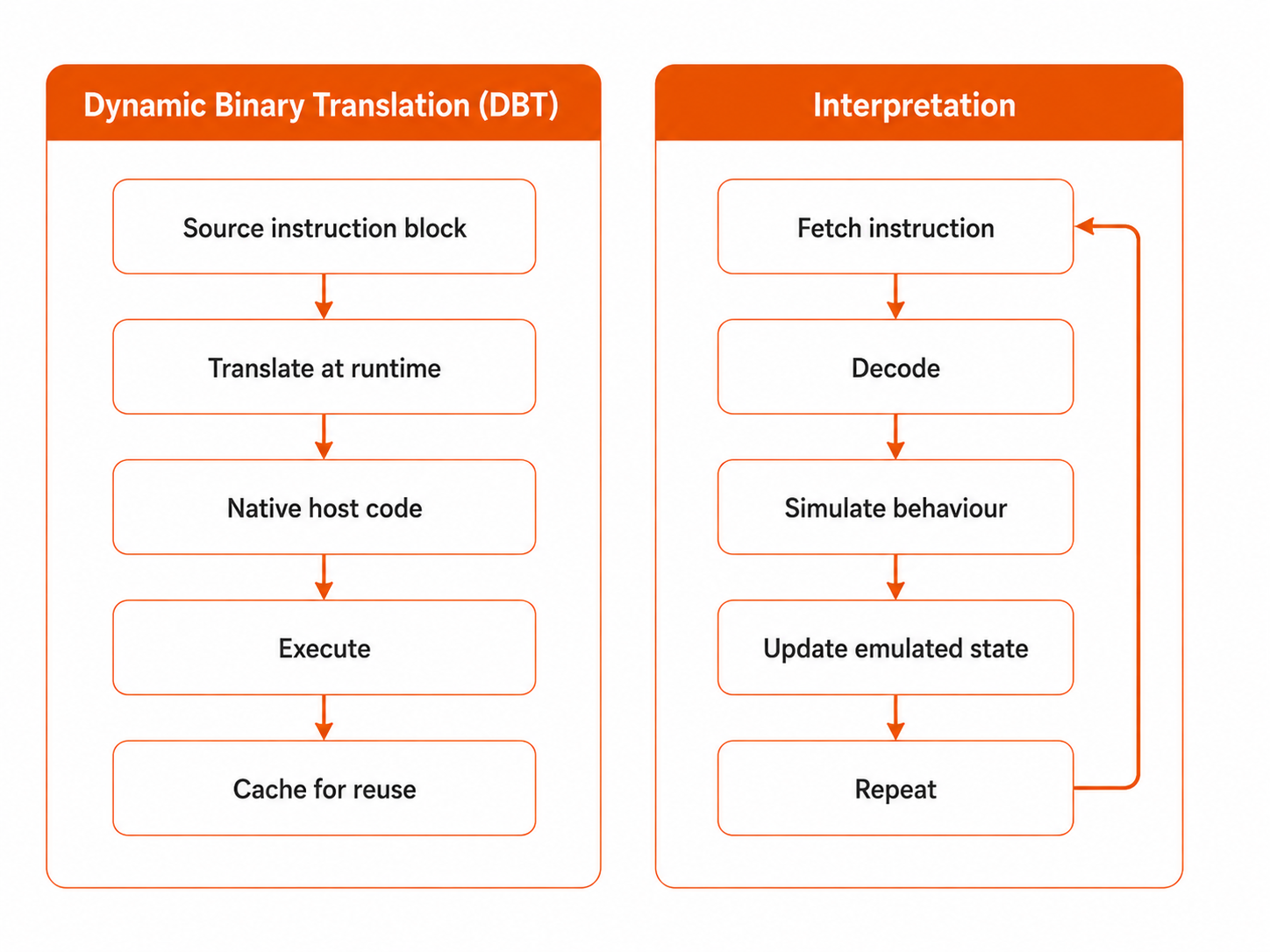
A simpler, but generally slower, approach is interpretation. Here, the emulator repeatedly fetches a source instruction, decodes it, performs its behaviour using code running on the host CPU, updates the emulated machine state, and moves to the next instruction. This introduces additional overhead because one emulated MIPS instruction may require the host processor to execute many instructions just to determine what that MIPS instruction means and reproduce its effects.
Note
- Aside: Dynamic Binary Translation
An emulator can take several approaches to reproducing the behaviour of the source instruction set. A faster approach is Dynamic Binary Translation, which takes the core idea of static binary translation but performs the translation at runtime. This helps avoid many of the problems static translation faces because the emulator no longer needs to determine the program’s complete control flow in advance. If, for example, an indirect jump leads to an address that could not be known beforehand, the emulator can simply wait until that jump actually occurs, observe the destination, translate the code found there into the host architecture, and cache the translated block so it can be reused later.
[NEW] Mipsy
What Mipsy Does
COMP1521 uses mipsy as its emulator. Mipsy is designed for students and aims to make MIPS easier to write, run, and debug. It simplifies many parts of the normal MIPS workflow. For example, rather than requiring us to manually assemble our .s file, link the resulting object files, produce a MIPS executable, and then pass that executable to an emulator, mipsy can take the assembly source directly and run it for us. It also provides a simpler environment for input and output, clearer error messages, and debugging tools that allow us to inspect what the emulated processor is doing. Its goal is therefore not to perfectly reproduce every detail of a real MIPS computer, but to provide a convenient environment for learning MIPS assembly.
[NEW] Running MIPS
To run a file called hello.s you would do:
1521 mipsy hello.s
on your CSE machine.
[NEW] Teaching Environment vs Real Environment
However, there is still a difference between the MIPS environment provided by mipsy and a conventional GNU + QEMU setup. Because mipsy is designed for teaching, it supports several conveniences and simplified behaviours that are not necessarily part of standard MIPS hardware or the GNU/Linux MIPS environment. As a result, a .s file that runs successfully under mipsy is not guaranteed to assemble or behave identically when passed through the GNU MIPS toolchain and executed with QEMU. Therefore, if you are first learning MIPS, it is generally best to stick with mipsy and, if desired, run or build it locally.
[NEW] GNU MIPS + QEMU
If you don't feel like running on a CSE machine or just want another emulator, a more conventional MIPS development setup can use the GNU toolchain alongside an emulator such as QEMU. Rather than accepting the .s source file directly, the GNU assembler first converts the MIPS assembly into an object file, which is then passed to the linker to produce a real MIPS executable. Since an x86-64 CPU cannot execute that binary natively, QEMU can then emulate the MIPS architecture and run it:
mipsel-linux-gnu-as hello.s -o hello.o
mipsel-linux-gnu-ld hello.o -o hello -e _start
qemu-mipsel ./hello
This gives us the longer pipeline:
flowchart TB
    A["hello.s"] --> B["GNU Assembler"]
    B --> C["hello.o"]
    C --> D["GNU Linker"]
    D --> E["MIPS ELF"]
    E --> F["QEMU"]
    F --> G["Running Program"]
By comparison, mipsy bundles much of this workflow into a single environment:
flowchart LR
    A["hello.s"] --> B["mipsy"]
    B --> C["Running Program"]
[NEW] Other Ways to Use Mipsy
Other methods for using mipsy include mipsy web, which isn't very practical for larger programs but suffices if you want to get a taste of MIPS without going through much hassle. Additionally, there is also a VS-Code extension which includes an LSP and provides many features such as code completion, diagnostics, debugging features & more.