01. Running MIPS
Running MIPS#
Why MIPS Needs an Emulator#
Your laptop probably contains an x86-64 or ARM64 processor, not a MIPS processor. Although all machine code is ultimately bits, those bits only acquire meaning through an instruction set architecture. A bit pattern encoding addi for MIPS may mean something entirely different—or nothing useful at all—to an x86-64 CPU.
This is not normally a problem for C because C source is portable at the source level. A compiler can translate the same source into machine code for different targets. MIPS assembly, however, has already committed to the MIPS ISA.
flowchart TD
    C["C source"] --> X["x86-64 compiler"]
    C --> A["ARM64 compiler"]
    C --> M["MIPS compiler"]
    X --> XB["x86-64 executable"]
    A --> AB["ARM64 executable"]
    M --> MB["MIPS executable"]
To run MIPS code on a non-MIPS host, we use software that reproduces the relevant behaviour of a MIPS machine. COMP1521 uses mipsy, an education-focused MIPS32 emulator.
Mipsy#
Mipsy accepts MIPS assembly, assembles it, and executes it inside a simulated environment. It also tracks registers and memory, implements the course's syscall interface, and provides debugging features intended to catch beginner mistakes.
The fastest route on a CSE machine is:
1521 mipsy hello.sYou can also use mipsy web, which provides an editor, register display, data view, input/output area, forward stepping, and backwards stepping in the browser.
Warning
Mipsy is the course environment
Mipsy is not a complete or perfectly faithful implementation of every feature in the MIPS32 specification. It intentionally favours useful diagnostics and course-friendly behaviour. In particular, course pseudo-instructions such as push, pop, begin, and end are mipsy conveniences and should not be assumed to work in an arbitrary assembler or emulator.
Your First Run#
Create answer.s:
	.text
main:
	li	$t0, 6
	li	$t1, 7
	mul	$t2, $t0, $t1		# int answer = 6 * 7;

	li	$v0, 0
	jr	$ra			# return 0;
Then run:
1521 mipsy answer.sThe program prints nothing because computing a value and producing output are separate operations. After execution, $t2 contains 42; to print it, we need the syscall workflow explained in Using MIPS.
Debugging Interactively#
Running a program from beginning to end only tells you its final behaviour. Assembly bugs are often easier to find one instruction at a time.
Start mipsy without a filename:
1521 mipsyThen use its interactive commands:
[mipsy] load answer.s
[mipsy] step
[mipsy] step 3
[mipsy] print $t2
[mipsy] run
[mipsy] h
h displays the commands supported by the installed version. The precise interface can evolve, so use the built-in help rather than memorising a large command list.
A Productive Debugging Routine#
When a translation fails, do not immediately rewrite it. Instead:
- Write down which C variable belongs to each register.
- Identify the first point where observed state differs from expected state.
- Step to that instruction.
- Inspect the relevant registers and, when necessary, memory.
- Check the instruction's operand order and the branch condition.
- Fix one cause, rerun the smallest failing case, and only then continue.
For a loop, the most useful checkpoints are normally its __init, __cond, __body, and __step labels. For an array, inspect the base address, index, scaled byte offset, and final element address separately. For a function, inspect $a0–$a3, $v0, $ra, $sp, and any saved registers.
flowchart TD
    A["Expected C state"] --> B["Step MIPS"]
    B --> C["Inspect registers / memory"]
    C --> D{"First mismatch?"}
    D -->|No| B
    D -->|Yes| E["Explain the instruction's effect"]
    E --> F["Make one correction"]
    F --> A
Common Failure Modes#
The program runs but prints nothing#
Register arithmetic does not automatically create output. Use a print syscall and ensure its argument is in $a0.
The wrong branch is taken#
Read the instruction literally. bge $t0, $t1, label branches when $t0 >= $t1; operand order matters. When implementing an if, remember that simplified C often branches on the opposite condition to skip the body.
An array access fails or produces nonsense#
An index is not necessarily a byte offset. int_array[i] requires i * 4 because each int occupies four bytes. Also check that lw and sw use a four-byte-aligned address.
A value disappears after jal#
Called functions may clobber $t0–$t9, $a0–$a3, and $v0. Preserve a value across a call in an $s register and obey the save/restore rules in MIPS Functions.
A function never returns properly#
Every jal overwrites $ra. A non-leaf function must save its incoming $ra before it calls another function and restore it before jr $ra.
Mipsy Web or the Command Line?#
Use whichever helps you reason most clearly:
| Tool | Particularly useful for |
|---|---|
| mipsy web | Seeing registers, memory, source, and output together; stepping backwards |
| command-line mipsy | Working with course files, terminal input/output, and the same environment used by lab commands |
Neither replaces testing. Try boundary cases, zero, negative values where valid, the first and last array element, empty loops, and multiple function calls. Autotests are useful evidence, but your own explanation of why the state changes is what makes the code debuggable.
Note
- Aside: emulation and binary translation
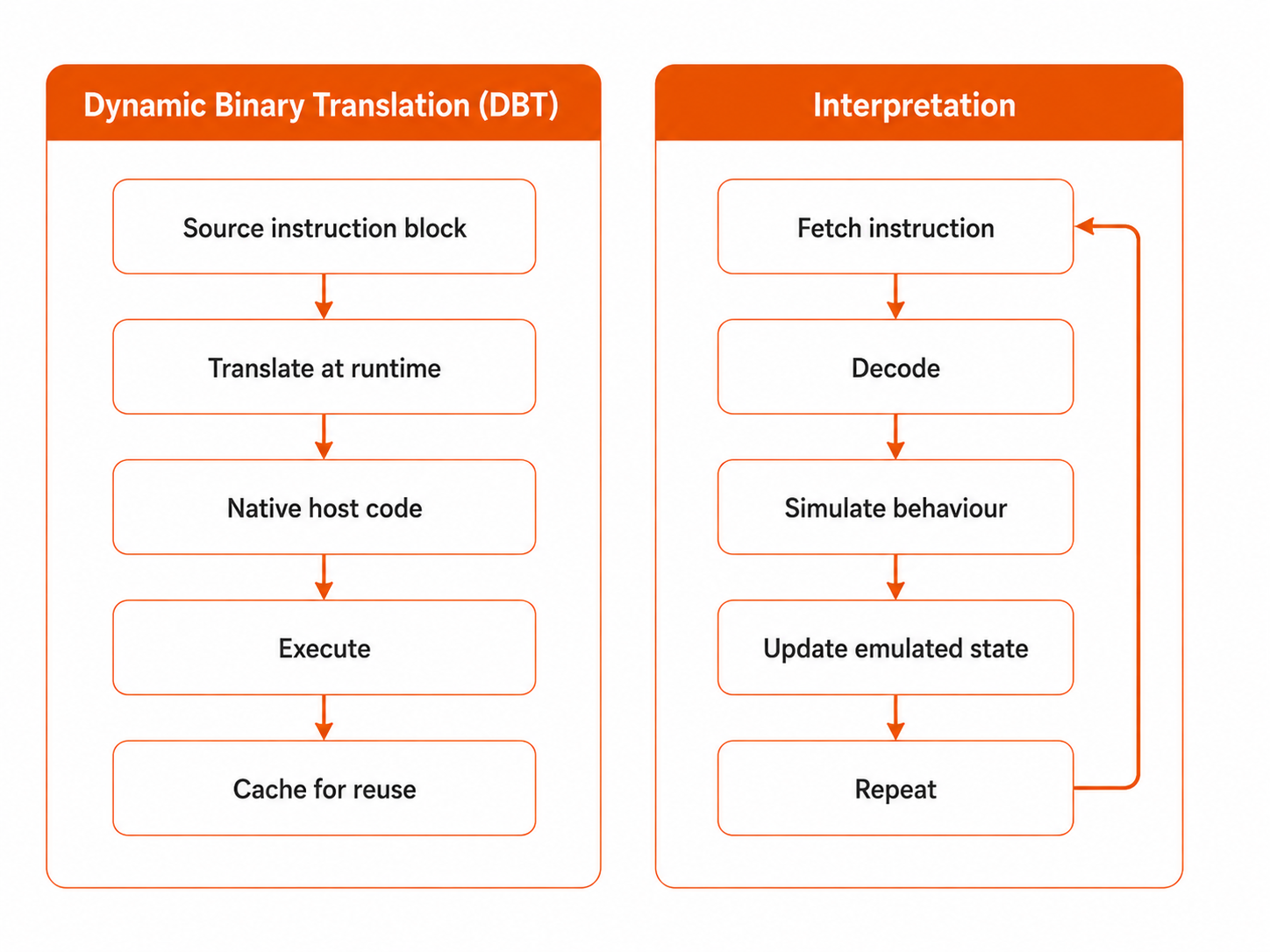
A simple emulator may repeatedly fetch a guest MIPS instruction, decode it, and reproduce its effect using host code. Faster systems can translate blocks of guest instructions into host instructions and cache the result, a technique known as dynamic binary translation. This is conceptually interesting, but it is not required to write COMP1521 MIPS: mipsy should be treated as the machine your course program runs on.
Other MIPS Environments#
A conventional toolchain may assemble and link a real MIPS ELF executable, then run it under an emulator such as QEMU:
flowchart TD
    S["program.s"] --> AS["MIPS assembler"]
    AS --> O["program.o"]
    O --> LD["MIPS linker"]
    LD --> ELF["MIPS executable"]
    ELF --> Q["QEMU"]
That environment has a different syscall interface, assembler syntax, ABI details, and supported pseudo-instructions. Code written specifically for mipsy is therefore not guaranteed to run unchanged. For course work, use the prescribed environment unless you have a particular reason to investigate the differences.