02. Using MIPS
Starting Off#
MIPS becomes far less mysterious once every line is read as a small state change. Instead of declaring an unlimited number of named C variables, we choose from a fixed set of registers and explicitly state what each instruction should do.
The course's minimal program shape is:
	.text
main:
	# instructions go here

	li	$v0, 0
	jr	$ra			# return 0;
.text tells the assembler that the following material belongs in the code segment. main: defines a label, which represents the address of the next instruction. The final two instructions place 0 in the return-value register and return to whatever called main.
Note
This is a course-friendly starting point, not the complete process startup sequence of a real operating system. The meaning of $v0 and $ra comes from the calling convention developed in MIPS Functions.
Registers Are Not Variables#
Registers can play the role of C variables, but they are not created, named, scoped, or typed by the MIPS language. $t0 is simply one 32-bit storage location.
	li	$t0, 5			# int x = 5;
	li	$t1, -2			# int y = -2;
The bits in a register might represent an integer, character, address, or mask. Your register plan gives those bits meaning:
	# Registers:
	# - $t0: x
	# - $t1: y
	# - $t2: result
Writing this plan before translating larger programs prevents accidental reuse.
Registers You Will Meet#
| Registers | Course role |
|---|---|
$zero |
always contains zero; writes are discarded |
$at |
assembler temporary; do not use it for your own variables |
$v0–$v1 |
expression/function results; $v0 also selects a mipsy syscall |
$a0–$a3 |
function or syscall arguments |
$t0–$t9 |
temporary values; not preserved across calls |
$s0–$s7 |
values preserved across calls by the callee |
$gp |
global pointer; normally left to the toolchain |
$sp |
stack pointer |
$fp |
frame pointer used by course function helpers |
$ra |
return address written by jal |
For now, $t registers are convenient local scratch space. Once functions appear, their values cannot be trusted across a jal. Registers $k0 and $k1 are reserved for kernel use, while $at may be overwritten when the assembler expands a pseudo-instruction. Avoid treating any of these as spare locals.
Arithmetic#
Most three-operand arithmetic follows:
instruction destination, source_1, source_2
For example:
	li	$t0, 20
	li	$t1, 6

	add	$t2, $t0, $t1		# $t2 = 20 + 6
	sub	$t3, $t0, $t1		# $t3 = 20 - 6
	mul	$t4, $t0, $t1		# $t4 = 20 * 6
	div	$t5, $t0, $t1		# $t5 = 20 / 6
	rem	$t6, $t0, $t1		# $t6 = 20 % 6
Subtraction, division, and remainder are order-sensitive. Read sub $t3, $t0, $t1 as an assignment: $t3 = $t0 - $t1.
An immediate is a literal value written in an instruction. Some instructions have a specific immediate form:
addi $t0, $t0, 5 # $t0 = $t0 + 5Do not assume that appending i works for every operation. Check the course instruction reference for the accepted operands and exact behaviour.
What an Immediate Really Is#
An immediate is a number written directly in an instruction:
addi $t0, $t1, 5Here, $t1 names a register, while 5 is stored as part of the instruction itself. It is not fetched from a second hidden register.
A real MIPS instruction is exactly 32 bits wide. Those 32 positions are divided into smaller, fixed groups, with each group performing one job: one group identifies the operation, another names a register, and another may hold the immediate. A consecutive group of bits used for one purpose is called a bit field. You can picture the instruction as a form with boxes of fixed sizes; the assembler fills each box, and the processor already knows how to read them.
For addi and addiu, the immediate field is 16 bits wide. Sixteen signed bits can directly represent values from -32768 to 32767. Before adding that immediate to a 32-bit register, the processor must widen it from 16 bits to 32 bits.
Sign Extension#
Sign extension widens a signed value without changing what it means. It copies the old leftmost bit—the sign bit—into every new position on the left:
16-bit +5:   00000000 00000101
32-bit +5:   00000000 00000000 00000000 00000101

16-bit -12:  11111111 11110100
32-bit -12:  11111111 11111111 11111111 11110100
Positive values begin with 0, so widening adds zeroes. Negative two's-complement values begin with 1, so widening adds ones. In both cases, the numerical value is preserved. Integers develops why the negative pattern works; for now, the important rule is that sign extension repeats the leftmost bit.
Zero Extension#
Zero extension also widens a bit pattern, but always fills the new positions with zeroes:
16-bit pattern: 11111111 11110100
zero-extended:  00000000 00000000 11111111 11110100
This preserves an unsigned interpretation of the original 16 bits. Logical immediate instructions such as andi, ori, and xori use zero extension because their immediates are treated as bit patterns rather than signed offsets.
Real Instructions, Pseudo-Instructions, and Traps#
The fixed field explains why one real instruction cannot contain every possible 32-bit constant:
	addi	$t0, $t1, -12		# real instruction: signed 16-bit immediate
	li	$t2, 0x12345678		# pseudo-instruction: assembler builds a 32-bit value
li is a pseudo-instruction: a convenient request understood by the assembler, not one fixed hardware instruction. The assembler is the program which translates assembly text into machine-code bits. When the requested constant is too large for one immediate field, it constructs the value using multiple real instructions.
The u in addiu does not mean that its immediate is zero-extended. Both addi and addiu sign-extend their 16-bit immediate. The difference appears when a signed result is outside the range of a 32-bit signed integer:
addiraises an overflow exception, also called a trap. A trap transfers control away from the normal next instruction so the exceptional condition can be handled; in a simulator, you will normally see an error instead of silently receiving a wrapped signed answer.addiudoes not trap for integer overflow. It keeps the low 32 result bits.
For example, adding 1 to 0x7fffffff is one larger than the greatest signed 32-bit integer. addi reports overflow, whereas addiu retains the low 32 bits, producing 0x80000000. The bits produced by addition are not different; the instruction's response to signed overflow is different.
Deciding Whether a Constant Fits#
The range belongs to the immediate field, not to the destination register. Work from the real instruction's field width:
| Source line | Does the written constant fit signed 16 bits? | Consequence |
|---|---|---|
addi $t0, $t1, 120 |
yes | one real addi can encode it |
addi $t0, $t1, -32768 |
yes | this is the smallest signed 16-bit value |
addi $t0, $t1, 40000 |
no | that source is not one valid real addi encoding |
li $t0, 40000 |
li is not restricted to one such field |
the assembler chooses a suitable expansion |
This is why “the register is 32 bits” does not imply that every instruction can contain a 32-bit literal. The register receives a 32-bit result, while the instruction still has only a fixed number of bits available to describe that result-producing operation.
Important
- Check the boundary
Which of 32767, 32768, -32768, and -32769 fit the signed 16-bit immediate of a real addi? Why does li not have the same one-instruction promise?
Note
- Reasoned answer
32767 and -32768 fit because the signed 16-bit range is exactly -32768 through 32767. The other two lie one step outside it. li describes the effect “place this constant in the register”; because it is a pseudo-instruction, the assembler may use more than one real instruction to achieve that effect.
add, addu, addi, and addiu#
All four ultimately add bit patterns, but their operand forms and overflow behaviour differ:
| Instruction | Inputs | On signed overflow |
|---|---|---|
add rd, rs, rt |
two registers | traps |
addu rd, rs, rt |
two registers | keeps the low 32 bits |
addi rt, rs, imm |
register + signed 16-bit immediate | traps |
addiu rt, rs, imm |
register + signed 16-bit immediate | keeps the low 32 bits |
Registers themselves remain untyped. The “unsigned” spelling controls overflow handling; it does not attach an unsigned type to the destination. When no overflow occurs, add and addu produce the same 32 bits.
Multiplication, Division, and HI / LO#
Classic two-operand multiplication and division use two special 32-bit registers named HI and LO. A full 32-by-32-bit multiplication can require 64 result bits, so mult places the upper half in HI and the lower half in LO:
	mult	$t0, $t1		# signed 64-bit product in HI:LO
	mflo	$t2			# low 32 bits of product
	mfhi	$t3			# high 32 bits of product
The real two-operand div places the quotient in LO and remainder in HI:
	div	$t0, $t1
	mflo	$t2			# quotient
	mfhi	$t3			# remainder
Mipsy's friendly three-operand div and rem forms hide that bookkeeping:
	div	$t2, $t0, $t1		# pseudo: quotient directly into $t2
	rem	$t3, $t0, $t1		# pseudo: remainder directly into $t3
Use multu and divu when the operands require unsigned interpretation. For ordinary introductory multiplication, mul rd, rs, rt directly keeps the low 32 bits and is usually the clearest form.
Tracing Register State#
Trace the effect of one instruction at a time. Registers not named as a destination retain their previous value:
	li	$t0, 7
	li	$t1, 3
	add	$t2, $t0, $t1
	sub	$t3, $t0, $t1
	mul	$t4, $t2, $t1
addi $t0, $t0, 2| After instruction | Register changed | New value |
|---|---|---|
li $t0, 7 |
$t0 |
7 |
li $t1, 3 |
$t1 |
3 |
add $t2, $t0, $t1 |
$t2 |
10 |
sub $t3, $t0, $t1 |
$t3 |
4 |
mul $t4, $t2, $t1 |
$t4 |
30 |
addi $t0, $t0, 2 |
$t0 |
9 |
At the end, $t1 is still 3 and $t2 is still 10. Reading an instruction as destination = expression using sources prevents the common mistake of mentally changing a source register as well.
Practice: Quick Checks#
- Which register is reserved for assembler-generated code, and why should you avoid storing a long-lived value there?
Note
- Answer
$at. Expanding a pseudo-instruction may overwrite it without an explicit $at operand in your source.
- What does the
uchange inaddiu, and what does it not change?
Note
- Answer
It disables the signed-overflow trap. It does not make the register typed as unsigned, and its 16-bit immediate is still sign-extended.
- Where do the quotient and remainder go after the real two-operand
div rs, rt?
Note
- Answer
The quotient goes to LO; the remainder goes to HI. Use mflo and mfhi to copy them into general-purpose registers.
Practice: Tracing#
- Trace this code and give the final values of
$t0,$t1, and$t2:
	li	$t0, 5
	addi	$t1, $t0, -2
	add	$t2, $t0, $t1
	addi	$t0, $t0, 1
Note
- Answer
$t0 = 6, $t1 = 3, and $t2 = 8. The last instruction changes $t0 only; it does not retroactively change $t1 or $t2.
- Assume
$t0 = 20and$t1 = 6. Afterdiv $t0, $t1,mflo $t2, andmfhi $t3, what are$t2and$t3?
Note
- Answer
$t2 = 3 and $t3 = 2.
- If
$t0 = 0x7fffffff, how doaddi $t1, $t0, 1andaddiu $t1, $t0, 1differ?
Note
- Answer
addi raises an integer-overflow exception. addiu keeps the low 32 bits, producing 0x80000000.
Moving Values Into Registers#
Three frequently used pseudo-instructions solve different problems:
	li	$t0, 42			# load the literal value 42
	la	$t1, message		# load the address represented by message
move $t2, $t0 # copy the bits from $t0 into $t2limeans load immediate.lameans load address.movecopies a register value.
The distinction between a value and its address is vital. If number labels a word containing 42, la $t0, number gives the address of that word. It does not load 42; that requires lw, as explained in MIPS Data and Memory.
Real and Pseudo-Instructions#
A real instruction has a direct machine-code encoding. A pseudo-instruction is accepted by the assembler and expanded into one or more real instructions.
li $t0, 5For a small value, an assembler can implement this effect using something equivalent to:
addi $t0, $zero, 5For a larger constant, it may need multiple instructions. Therefore, “one line of assembly” does not always mean “one CPU instruction.” This matters for machine-code questions and performance analysis, but not every introductory translation requires you to expand pseudo-instructions manually.
Common course pseudo-instructions include:
| Convenient form | Typical underlying idea |
|---|---|
move $t0, $t1 |
add $t1 to zero |
li $t0, constant |
one or more instructions which construct the constant |
la $t0, label |
construct the label's address |
b label |
unconditional branch, commonly encoded using equality with $zero |
blt $t0, $t1, label |
compare with slt, then branch on the result |
rem $t0, $t1, $t2 |
divide, then move the remainder from HI |
The exact expansion belongs to the assembler and may vary with operands. Reason about the pseudo-instruction's documented effect unless a question explicitly asks for the real encoding or expansion.
Practice: Challenge#
- Why can one
liline become more than one machine instruction, whileaddiis always one instruction?
Note
- Answer
addi has a fixed encoding with only a 16-bit immediate. li promises to load a whole constant, so the assembler may need several real instructions to construct a value which does not fit that field.
Assembly Syntax#
A typical line has up to four pieces:
label: opcode operands # comment
Labels#
A label associates a name with an address:
loop__cond:
	bge	$t0, $t1, loop__end
Labels do not execute and do not contain values themselves. They name positions in code or data.
Comments#
Comments begin with #:
add $t2, $t0, $t1 # sum = x + y;Equivalent C makes translation code considerably easier to check than comments which merely repeat the mnemonic.
Directives#
Assembler directives begin with . and instruct the assembler rather than the CPU:
	.text
	.data
	.word	42
	.asciiz	"hello\n"
They define sections and data; they are not runtime instructions.
Constants#
Named constants improve clarity:
N_ELEMENTS = 10
NEWLINE = '\n'
They behave similarly to compile-time constants: the assembler substitutes their values; no register or memory is allocated merely by defining the name.
Style#
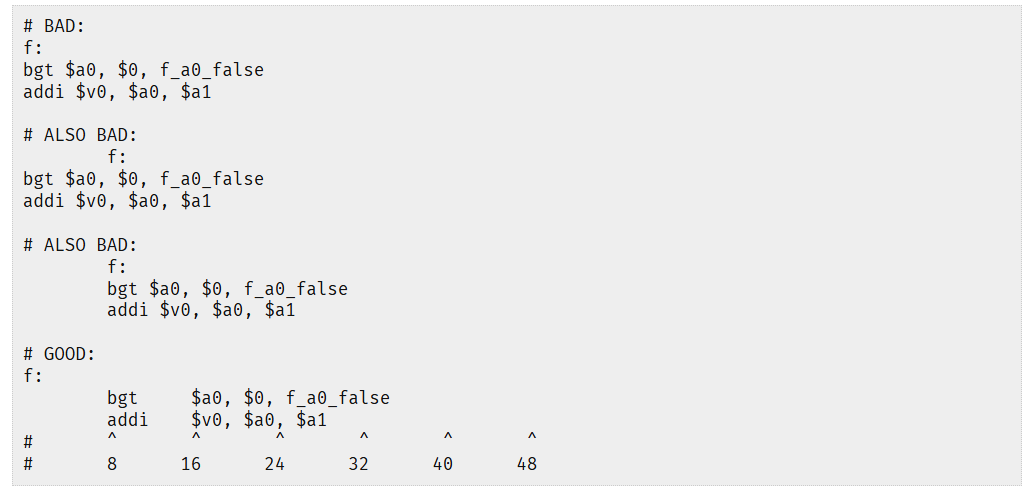
Readable assembly exposes structure through labels and alignment. A useful course convention is:
- labels begin at the left margin;
- instructions are indented by one tab;
- mnemonics, operands, and comments align at consistent tab stops;
- labels describe their role, such as
loop_rows__condorif_negative__end; - comments show equivalent C and register purpose.
loop_i__cond:
	bge	$t0, $t1, loop_i__end	# if (i >= n) goto loop_i__end;
loop_i__body:
	add	$t2, $t2, $t0		# sum += i;
loop_i__step:
	addi	$t0, $t0, 1		# i++;
	b	loop_i__cond
loop_i__end:
Do not indent instructions further merely because C had nested braces. Assembly has no braces; labels express the control-flow structure.
System Calls#
A normal user program cannot directly manipulate arbitrary hardware. It requests privileged services through system calls. Mipsy simulates a small environment and exposes a teaching-oriented syscall interface.
Every mipsy syscall follows the same pattern:
- Put the syscall number in
$v0. - Put arguments in the documented argument registers.
- Execute
syscall. - Read any documented result register.
Printing an Integer#
	li	$v0, 1			# syscall 1: print_int
	li	$a0, 42			# argument: value to print
	syscall
Reading an Integer#
	li	$v0, 5			# syscall 5: read_int
	syscall
	move	$t0, $v0		# int n = read_int();
The result arrives in $v0, which is why we copy it before placing another syscall number there.
Printing a Character#
	li	$v0, 11			# syscall 11: print_character
	li	$a0, '\n'
	syscall
Printing a String#
A string is an array in memory, so the syscall receives its address:
	.text
main:
	li	$v0, 4			# syscall 4: print_string
	la	$a0, message
	syscall

	li	$v0, 0
	jr	$ra

	.data
message:
	.asciiz	"Hello COMP1521!\n"
.asciiz emits the characters followed by a nul byte ('\0'). The syscall continues reading bytes from the supplied address until it encounters that terminator.
Common Mipsy Syscalls#
$v0 |
Service | Arguments | Result |
|---|---|---|---|
1 |
print integer | $a0 = integer |
— |
4 |
print string | $a0 = address of nul-terminated string |
— |
5 |
read integer | — | $v0 = integer |
8 |
read string | $a0 = buffer, $a1 = size |
buffer changed |
9 |
sbrk |
$a0 = number of bytes |
— |
10 |
exit | — | does not return |
11 |
print character | $a0 = character value |
— |
12 |
read character | — | $v0 = character value |
17 |
exit with status | $a0 = status |
does not return |
The original course table is also a useful visual summary of the most common console services:
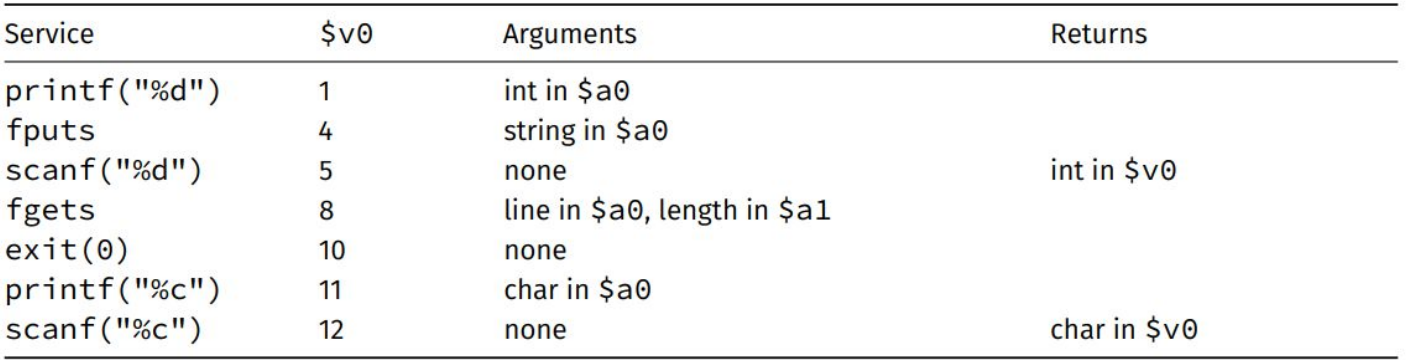
Mipsy's complete table also documents file operations and limitations. Do not mix these teaching syscall numbers with Linux MIPS syscall numbers; they are different interfaces.
In the current COMP1521 mipsy interface, syscall 9, named sbrk, extends the simulated .data segment by the requested number of bytes. In other words, it asks for more data-segment memory at runtime. The course reference does not document an allocated-address result in $v0. Some SPIM/MARS references describe a different sbrk contract, which is exactly why the mipsy table should be treated as authoritative here.
Warning
A syscall may fail
An operating system does not grant every syntactically valid request. A file descriptor is a small integer handle for an open file or I/O connection; invalid descriptors, permissions, resource limits, and arguments can all cause failure. Always consult the documented result when a syscall reports one.
A Complete First Program#
This reads two integers and prints their integer average:
	.text
main:
	li	$v0, 4
	la	$a0, prompt_a
	syscall				# printf("First number: ");

	li	$v0, 5
	syscall
	move	$t0, $v0		# int a = read_int();

	li	$v0, 4
	la	$a0, prompt_b
	syscall				# printf("Second number: ");

	li	$v0, 5
	syscall
	move	$t1, $v0		# int b = read_int();

	add	$t2, $t0, $t1
	div	$t2, $t2, 2		# int average = (a + b) / 2;

	li	$v0, 1
	move	$a0, $t2
	syscall				# printf("%d", average);

	li	$v0, 11
	li	$a0, '\n'
	syscall				# putchar('\n');

	li	$v0, 0
	jr	$ra

	.data
prompt_a:
	.asciiz	"First number: "
prompt_b:
	.asciiz	"Second number: "
Notice how I/O makes $v0 and $a0 temporary pieces of the syscall interface. The actual C variables remain in $t0, $t1, and $t2.
This first program assumes that a + b fits in a signed 32-bit integer. The addition can overflow before the division even when the mathematical average itself would fit; robust code must either constrain the inputs or use an overflow-safe averaging method.
Practice: Writing / Translation#
- Write MIPS which places the address of
countin$t0, then loads the word stored there into$t1.
Note
- Answer
la $t0, count followed by lw $t1, 0($t0).
- Write the mipsy syscall sequence which prints the integer already held in
$s0.
Note
- Answer
li $v0, 1, then move $a0, $s0, then syscall.
- Classify each as real or pseudo in the course environment:
addi,move,li,mflo,b.
Note
- Answer
addi and mflo are real instructions. move, li, and b are pseudo-instructions.
Practice: Cumulative Program#
- Write a complete mipsy program which reads one integer
n, calculates3 * n - 4, prints the result followed by a newline, and returns zero. Include a register plan and ensure later syscall numbers do not destroy the calculated result.
Note
- Cumulative Program Answer
Keep the input and calculated result in $t registers. $v0 and $a0 are reused by each syscall, so neither should be the only long-lived copy of the answer.
	.text
main:
	# Registers:
	# - $t0: int n
	# - $t1: int result

	li	$v0, 5
	syscall
	move	$t0, $v0		# int n = read_int();

	mul	$t1, $t0, 3
	addi	$t1, $t1, -4		# int result = 3 * n - 4;

	li	$v0, 1
	move	$a0, $t1
	syscall				# print_int(result);

	li	$v0, 11
	li	$a0, '\n'
	syscall				# print_character('\n');

	li	$v0, 0
	jr	$ra
What Comes Next#
Linear instructions are enough for arithmetic, but not for decisions or repetition. MIPS Control introduces branches, labels, simplified C, short-circuit Boolean expressions, and loops. MIPS Data and Memory then leaves the register-only world and explains how addresses are used to access global variables, arrays, and structs.