02. Using MIPS
Using MIPS#
Starting Off#
MIPS becomes far less mysterious once every line is read as a small state change. Instead of declaring an unlimited number of named C variables, we choose from a fixed set of registers and explicitly state what each instruction should do.
The course's minimal program shape is:
	.text
main:
	# instructions go here

	li	$v0, 0
	jr	$ra			# return 0;
.text tells the assembler that the following material belongs in the code segment. main: defines a label, which represents the address of the next instruction. The final two instructions place 0 in the return-value register and return to whatever called main.
Note
This is a course-friendly starting point, not the complete process startup sequence of a real operating system. The meaning of $v0 and $ra comes from the calling convention developed in MIPS Functions.
Registers Are Not Variables#
Registers can play the role of C variables, but they are not created, named, scoped, or typed by the MIPS language. $t0 is simply one 32-bit storage location.
	li	$t0, 5			# int x = 5;
	li	$t1, -2			# int y = -2;
The bits in a register might represent an integer, character, address, or mask. Your register plan gives those bits meaning:
	# Registers:
	# - $t0: x
	# - $t1: y
	# - $t2: result
Writing this plan before translating larger programs prevents accidental reuse.
Registers You Will Meet#
| Registers | Course role |
|---|---|
$zero |
always contains zero; writes are discarded |
$v0 |
return value; also selects a mipsy syscall |
$a0–$a3 |
function or syscall arguments |
$t0–$t9 |
temporary values; not preserved across calls |
$s0–$s7 |
values preserved across calls by the callee |
$sp |
stack pointer |
$fp |
frame pointer used by course function helpers |
$ra |
return address written by jal |
For now, $t registers are convenient local scratch space. Once functions appear, their values cannot be trusted across a jal.
Arithmetic#
Most three-operand arithmetic follows:
instruction destination, source_1, source_2
For example:
	li	$t0, 20
	li	$t1, 6

	add	$t2, $t0, $t1		# $t2 = 20 + 6
	sub	$t3, $t0, $t1		# $t3 = 20 - 6
	mul	$t4, $t0, $t1		# $t4 = 20 * 6
	div	$t5, $t0, $t1		# $t5 = 20 / 6
	rem	$t6, $t0, $t1		# $t6 = 20 % 6
Subtraction, division, and remainder are order-sensitive. Read sub $t3, $t0, $t1 as an assignment: $t3 = $t0 - $t1.
An immediate is a literal value written in an instruction. Some instructions have a specific immediate form:
addi $t0, $t0, 5 # $t0 = $t0 + 5Do not assume that appending i works for every operation. Check the course instruction reference for the accepted operands and exact behaviour.
Moving Values Into Registers#
Three frequently used pseudo-instructions solve different problems:
	li	$t0, 42			# load the literal value 42
	la	$t1, message		# load the address represented by message
move $t2, $t0 # copy the bits from $t0 into $t2limeans load immediate.lameans load address.movecopies a register value.
The distinction between a value and its address is vital. If number labels a word containing 42, la $t0, number gives the address of that word. It does not load 42; that requires lw, as explained in MIPS Data and Memory.
Real and Pseudo-Instructions#
A real instruction has a direct machine-code encoding. A pseudo-instruction is accepted by the assembler and expanded into one or more real instructions.
li $t0, 5For a small value, an assembler can implement this effect using something equivalent to:
addi $t0, $zero, 5For a larger constant, it may need multiple instructions. Therefore, “one line of assembly” does not always mean “one CPU instruction.” This matters for machine-code questions and performance analysis, but not every introductory translation requires you to expand pseudo-instructions manually.
Assembly Syntax#
A typical line has up to four pieces:
label: opcode operands # comment
Labels#
A label associates a name with an address:
loop__cond:
	bge	$t0, $t1, loop__end
Labels do not execute and do not contain values themselves. They name positions in code or data.
Comments#
Comments begin with #:
add $t2, $t0, $t1 # sum = x + y;Equivalent C makes translation code considerably easier to check than comments which merely repeat the mnemonic.
Directives#
Assembler directives begin with . and instruct the assembler rather than the CPU:
	.text
	.data
	.word	42
	.asciiz	"hello\n"
They define sections and data; they are not runtime instructions.
Constants#
Named constants improve clarity:
N_ELEMENTS = 10
NEWLINE = '\n'
They behave similarly to compile-time constants: the assembler substitutes their values; no register or memory is allocated merely by defining the name.
Style#
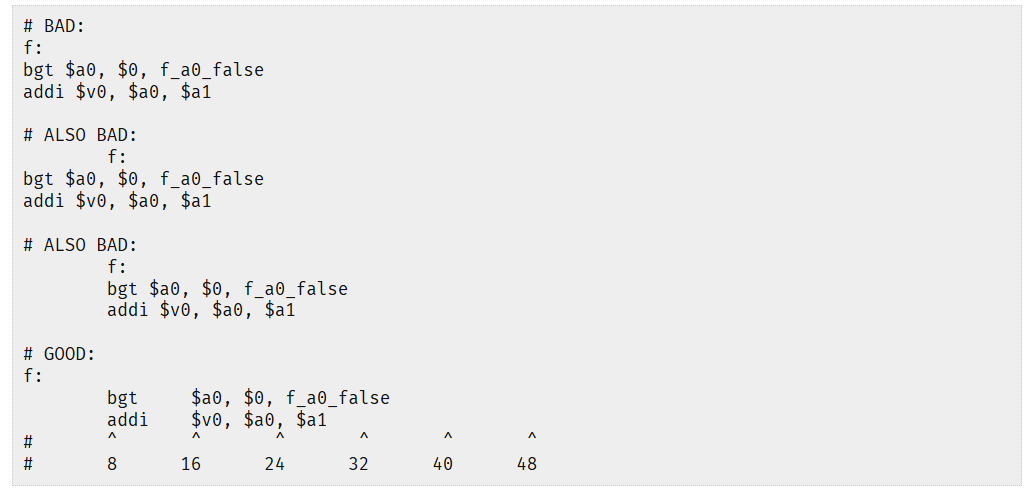
Readable assembly exposes structure through labels and alignment. A useful course convention is:
- labels begin at the left margin;
- instructions are indented by one tab;
- mnemonics, operands, and comments align at consistent tab stops;
- labels describe their role, such as
loop_rows__condorif_negative__end; - comments show equivalent C and register purpose.
loop_i__cond:
	bge	$t0, $t1, loop_i__end	# if (i >= n) goto loop_i__end;
loop_i__body:
	add	$t2, $t2, $t0		# sum += i;
loop_i__step:
	addi	$t0, $t0, 1		# i++;
	b	loop_i__cond
loop_i__end:
Do not indent instructions further merely because C had nested braces. Assembly has no braces; labels express the control-flow structure.
System Calls#
A normal user program cannot directly manipulate arbitrary hardware. It requests privileged services through system calls. Mipsy simulates a small environment and exposes a teaching-oriented syscall interface.
Every mipsy syscall follows the same pattern:
- Put the syscall number in
$v0. - Put arguments in the documented argument registers.
- Execute
syscall. - Read any documented result register.
Printing an Integer#
	li	$v0, 1			# syscall 1: print_int
	li	$a0, 42			# argument: value to print
	syscall
Reading an Integer#
	li	$v0, 5			# syscall 5: read_int
	syscall
	move	$t0, $v0		# int n = read_int();
The result arrives in $v0, which is why we copy it before placing another syscall number there.
Printing a Character#
	li	$v0, 11			# syscall 11: print_character
	li	$a0, '\n'
	syscall
Printing a String#
A string is an array in memory, so the syscall receives its address:
	.text
main:
	li	$v0, 4			# syscall 4: print_string
	la	$a0, message
	syscall

	li	$v0, 0
	jr	$ra

	.data
message:
	.asciiz	"Hello COMP1521!\n"
.asciiz emits the characters followed by a nul byte ('\0'). The syscall continues reading bytes from the supplied address until it encounters that terminator.
Common Mipsy Syscalls#
$v0 |
Service | Arguments | Result |
|---|---|---|---|
1 |
print integer | $a0 = integer |
— |
4 |
print string | $a0 = address of nul-terminated string |
— |
5 |
read integer | — | $v0 = integer |
8 |
read string | $a0 = buffer, $a1 = size |
buffer changed |
9 |
sbrk |
$a0 = number of bytes |
— |
10 |
exit | — | does not return |
11 |
print character | $a0 = character value |
— |
12 |
read character | — | $v0 = character value |
17 |
exit with status | $a0 = status |
does not return |
The original course table is also a useful visual summary of the most common console services:
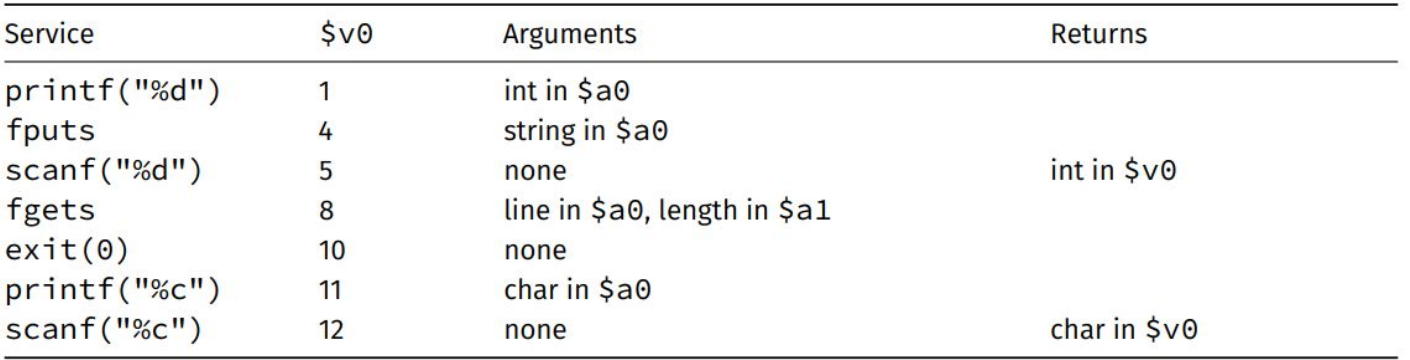
Mipsy's complete table also documents file operations and limitations. Do not mix these teaching syscall numbers with Linux MIPS syscall numbers; they are different interfaces.
In the current COMP1521 mipsy interface, syscall 9 extends the .data segment by the requested number of bytes; the course reference does not document an allocated-address result in $v0. Some SPIM/MARS references describe a different sbrk contract, which is exactly why the mipsy table should be treated as authoritative here.
Warning
A syscall may fail
An operating system does not grant every syntactically valid request. File descriptors, permissions, resource limits, and arguments can all cause failure. Always consult the documented result when a syscall reports one.
A Complete First Program#
This reads two integers and prints their integer average:
	.text
main:
	li	$v0, 4
	la	$a0, prompt_a
	syscall				# printf("First number: ");

	li	$v0, 5
	syscall
	move	$t0, $v0		# int a = read_int();

	li	$v0, 4
	la	$a0, prompt_b
	syscall				# printf("Second number: ");

	li	$v0, 5
	syscall
	move	$t1, $v0		# int b = read_int();

	add	$t2, $t0, $t1
	div	$t2, $t2, 2		# int average = (a + b) / 2;

	li	$v0, 1
	move	$a0, $t2
	syscall				# printf("%d", average);

	li	$v0, 11
	li	$a0, '\n'
	syscall				# putchar('\n');

	li	$v0, 0
	jr	$ra

	.data
prompt_a:
	.asciiz	"First number: "
prompt_b:
	.asciiz	"Second number: "
Notice how I/O makes $v0 and $a0 temporary pieces of the syscall interface. The actual C variables remain in $t0, $t1, and $t2.
This first program assumes that a + b fits in a signed 32-bit integer. The addition can overflow before the division even when the mathematical average itself would fit; robust code must either constrain the inputs or use an overflow-safe averaging method.
What Comes Next#
Linear instructions are enough for arithmetic, but not for decisions or repetition. MIPS Control introduces branches, labels, simplified C, short-circuit Boolean expressions, and loops. MIPS Data and Memory then leaves the register-only world and explains how addresses are used to access global variables, arrays, and structs.