07. Bitwise Operations
The operators in this note allow us to inspect and manipulate the individual bits of an integer. They are used extensively for packed data, permissions, instruction encodings, device registers, networking and file flags. Before continuing, it is worth being comfortable with binary and hexadecimal notation from Integers.
There are six bitwise operators in C. The worked patterns and conventions here follow the official COMP1521 bitwise-operations notes:
| Operator | Name | Typical purpose |
|---|---|---|
& |
bitwise AND | retain or test selected bits |
| |
bitwise OR | set selected bits |
^ |
bitwise XOR | toggle selected bits or find differences |
~ |
bitwise NOT | invert every bit |
<< |
left shift | move bits left, often to construct a mask |
>> |
right shift | move bits right, often to extract a field |
These operators work on the individual columns of a bit pattern. They are not the same as the logical operators &&, || and !, which treat each complete value as either false (0) or true (non-zero).
5 && 6   // 1: both complete values are non-zero
5 & 6    // 4: 0101 & 0110 = 0100
Thinking One Bit at a Time#
Every multi-bit operation is built by applying a one-bit truth table independently to corresponding positions.
Bitwise AND#
AND produces 1 only when both input bits are 1:
x |
y |
x & y |
|---|---|---|
| 0 | 0 | 0 |
| 0 | 1 | 0 |
| 1 | 0 | 0 |
| 1 | 1 | 1 |
For a single bit, the useful identities are:
x & 0 = 0
x & 1 = x
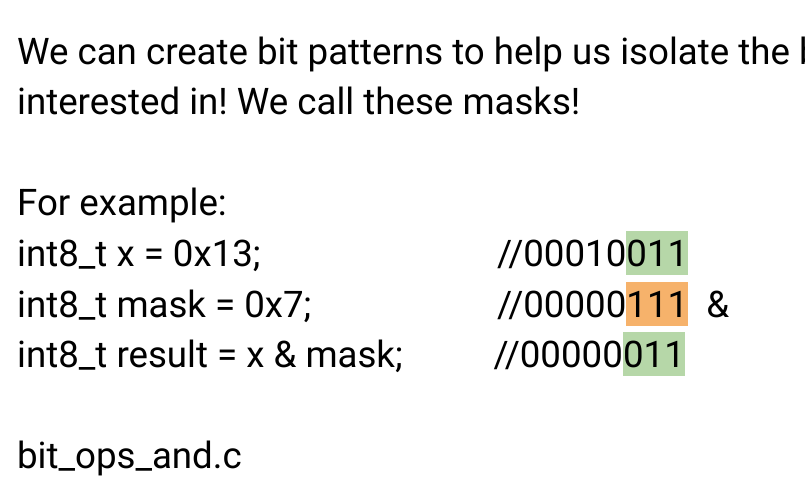
A 0 in a mask clears the corresponding result bit, whilst a 1 allows the original bit to pass through. This makes AND useful for selecting bits:
  00010011    x = 0x13
& 00000111    mask = 0x07
----------
  00000011    result = 0x03
Bitwise OR#
OR produces 1 when at least one input bit is 1:
x |
y |
x | y |
|---|---|---|
| 0 | 0 | 0 |
| 0 | 1 | 1 |
| 1 | 0 | 1 |
| 1 | 1 | 1 |
Its useful identities are:
x | 0 = x
x | 1 = 1
A 1 in the mask forces the result bit on, whilst a 0 preserves the original bit. OR is therefore useful for setting bits:
  00010011    x = 0x13
| 00000111    mask = 0x07
----------
  00010111    result = 0x17
Bitwise XOR#
Exclusive OR produces 1 when the two input bits differ:
x |
y |
x ^ y |
|---|---|---|
| 0 | 0 | 0 |
| 0 | 1 | 1 |
| 1 | 0 | 1 |
| 1 | 1 | 0 |
Its useful identities are:
x ^ 0 = x
x ^ 1 = the opposite of x
x ^ x = 0
A 1 in the mask flips the corresponding bit, whilst a 0 preserves it:
  00010011    x = 0x13
^ 00000111    mask = 0x07
----------
  00010100    result = 0x14
Applying the same XOR mask twice returns the original value because every selected bit is flipped twice:
Bitwise NOT#
NOT is unary: it flips every bit in its operand.
~00010011 = 11101100
This does not mean “make the number negative”. In two's complement, -x is equivalent to ~x + 1, not merely ~x.
There is also a width-related trap in C. Small integer operands undergo integer promotion before most arithmetic and bitwise operations:
uint8_t x = 0x13;
printf("%x\n", ~x);       // commonly ffffffec, not ec

uint8_t y = (uint8_t)~x;  // truncates back to 8 bits: ec
When reasoning about ~, be explicit about the width of the result you intend to keep.
Bit Masks#
A mask is a bit pattern designed to select particular positions. For one bit at position n, where the LSB is position 0, the mask is:
uint32_t mask = 1u << n;The unsigned 1u is deliberate. Shifts are easier to reason about when their left operand is unsigned.
Checking a bit#
AND the value with the mask:
bool is_set = (value & (1u << n)) != 0;The expression before != 0 is either zero or a value whose bit n is set. It is not necessarily exactly 1.
Setting a bit#
OR the value with the mask:
value |= 1u << n;Clearing a bit#
Invert the mask so that every position is 1 except the bit to clear, then AND:
value &= ~(1u << n);Toggling a bit#
XOR the value with the mask:
value ^= 1u << n;The four operations can be remembered by what their masks do:
| Goal | Expression | Masked bit | Unmasked bits |
|---|---|---|---|
| check | value & mask |
retained for inspection | cleared in temporary result |
| set | value | mask |
forced to 1 | preserved |
| clear | value & ~mask |
forced to 0 | preserved |
| toggle | value ^ mask |
inverted | preserved |
Constructing Masks#
The difficult part of many questions is not applying the operator; it is constructing the right mask.
The lowest n bits#
For 0 < n < width, the lowest n bits can be set using:
uint32_t mask = (1u << n) - 1;Why does this work? 1u << n has a single 1 at position n. Subtracting one borrows through every lower position:
1 << 5       00100000
(1 << 5)-1   00011111
Warning
For a 32-bit value, 1u << 32 is invalid: the shift count must be smaller than the width of the promoted left operand. If n may equal 32, handle that case separately or use a wider type for constructing the mask.
A range of bits#
Suppose we want bits low through high, inclusive, with 0 <= low <= high < 32. The number of bits is:
unsigned length = high - low + 1;First construct length low 1 bits, then move them into position. Using UINT32_MAX also handles the full-width case without ever evaluating the invalid expression 1u << 32:
uint32_t low_mask = UINT32_MAX >> (32 - length);
uint32_t mask = low_mask << low;
For bits 8 through 15:
low 8 ones:     00000000 00000000 00000000 11111111
shift left 8:   00000000 00000000 11111111 00000000
Extracting a range#
Mask away the unwanted bits, then shift the field down to bit 0:
uint32_t extract_range(uint32_t value, unsigned low, unsigned high) {
    // Precondition: 0 <= low <= high < 32.
    unsigned length = high - low + 1;
    uint32_t mask = UINT32_MAX >> (32 - length);
    return (value >> low) & mask;
}
Shifting first is often simpler: the desired low bit becomes bit 0, after which a low-bit mask selects the desired width.
Replacing a range#
Replacing a packed field requires two stages: clear the destination field, then OR in the shifted replacement.
uint32_t replace_range(
    uint32_t value,
    unsigned low,
    unsigned high,
    uint32_t replacement
) {
    // Precondition: 0 <= low <= high < 32.
    unsigned length = high - low + 1;
    uint32_t low_mask = UINT32_MAX >> (32 - length);
    uint32_t field_mask = low_mask << low;

    value &= ~field_mask;
    value |= (replacement & low_mask) << low;
    return value;
}
The replacement & low_mask prevents high bits from leaking outside the destination field.
Worked trace: replacing one byte#
Suppose value = 0x12345678 and we want to replace bits 8 through 15 with 0xAB. Work in stages instead of trying to invent one large expression:
value:                    12 34 56 78
field mask:               00 00 FF 00
clear the old field:      12 34 00 78
shift 0xAB left 8 bits:   00 00 AB 00
OR the two results:       12 34 AB 78
uint32_t value = 0x12345678;
uint32_t field_mask = 0xFFu << 8;

value &= ~field_mask;
value |= (0xABu & 0xFFu) << 8;
// value is now 0x1234AB78
The clearing step matters. OR can turn zeroes into ones, but it cannot turn an old 1 into the replacement's 0. Clearing creates a blank field before the new bits are inserted.
Tip
- Field-question workflow
Write the bit positions above the value, shift the desired field down to bit 0, then mask it to the field's width. To replace a field, clear the destination first and only then OR in the masked replacement. This order avoids most off-by-one and leaking-bit mistakes.
These examples use UINT32_MAX from <stdint.h>. The stated precondition is still necessary: without it, subtracting the indices can underflow and a shift count can fall outside the range 0 through 31.
Note
Checkpoint
- Build a mask whose
1bits identify exactly the field you want to affect. - Use AND to inspect or clear, OR to set, and XOR to toggle.
- For a multi-bit field: shift it into position, mask it, then combine it with the untouched bits.
Practice: Challenge#
- Write a width-safe C expression which creates a mask covering bits
lowthroughhighinclusive for auint32_t, including the case where the field spans all 32 bits. State the required precondition.
Note
- Challenge Answer
With 0 <= low <= high < 32, let length = high - low + 1, then use (UINT32_MAX >> (32 - length)) << low. When length is 32 the right shift count is zero, so the expression never evaluates the invalid 1u << 32.
Bit Flags#
When several independent yes/no properties must be stored, one bit can represent each property. Each named flag is a power of two:
#define CAN_READ     (1u << 0)
#define CAN_WRITE    (1u << 1)
#define CAN_EXECUTE  (1u << 2)
#define IS_HIDDEN    (1u << 3)
Flags can then be combined using OR:
uint32_t permissions = CAN_READ | CAN_WRITE;

if (permissions & CAN_WRITE) {
    // writing is permitted
}

permissions |= CAN_EXECUTE;   // add a flag
permissions &= ~CAN_WRITE;    // remove a flag
This is precisely why functions such as open in File Systems accept flags combined with |: every constant occupies a distinct subset of bits.
A set represented by bits#
A bitset uses bit n to represent whether integer n belongs to a set. A uint64_t can represent a subset of the values 0 through 63:
uint64_t set = 0;
set |= 1ULL << 4;                 // insert 4
set |= 1ULL << 19;                // insert 19

bool contains_4 = set & (1ULL << 4);
set &= ~(1ULL << 4);              // remove 4
Set operations become bitwise operations:
| Set operation | Bitset operation |
|---|---|
| union | a | b |
| intersection | a & b |
| symmetric difference | a ^ b |
| difference | a & ~b |
Shift Operators#
Shifts move a bit pattern whilst keeping the result at a fixed width. Bits which fall off an end are discarded.
Left shift#
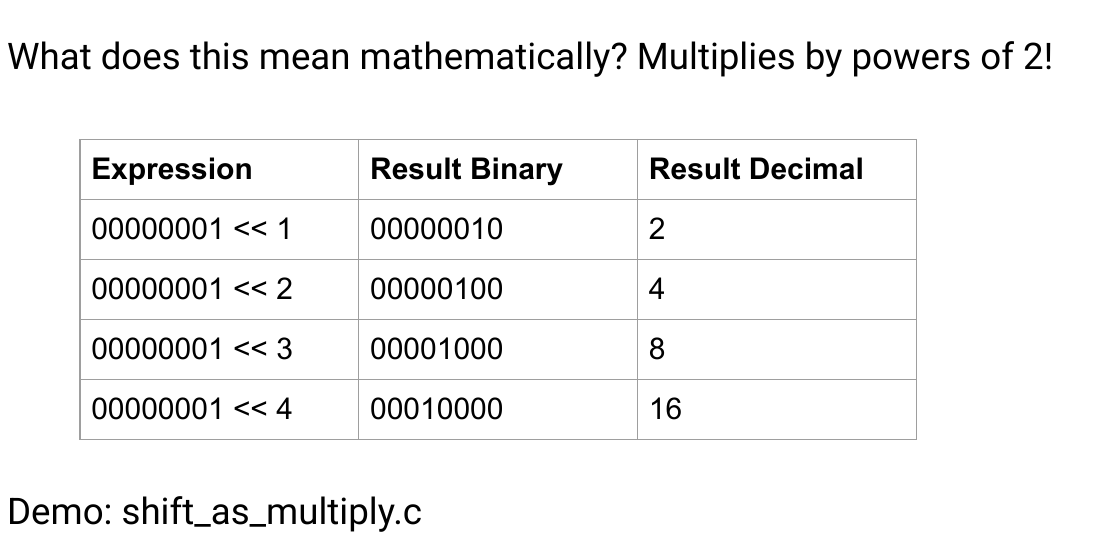
value << n moves every bit n positions towards the MSB and inserts zeroes on the right:
00000101 << 2 = 00010100
       5          20
When no significant bit is discarded, shifting an unsigned value left by n multiplies it by . It is safer to think of the operation as moving bits, however, because fixed-width overflow may discard high bits:
11000000 << 2 = 00000000 in eight bits
In C, left-shifting an unsigned value is defined modulo one more than the maximum value. Left-shifting a negative signed value is undefined, and even a positive signed shift can be undefined if its mathematical result is not representable. Use unsigned operands for bit manipulation.
Logical right shift#
For an unsigned value, value >> n shifts bits towards the LSB and inserts zeroes on the left:
00010111 >> 2 = 00000101
      23           5
This corresponds to unsigned integer division by , with any remainder discarded.
Arithmetic right shift#
An arithmetic right shift copies the sign bit into the newly opened upper positions:
11110000 >> 2 = 11111100
This preserves the sign of a two's-complement value. In C, the result of right-shifting a negative signed integer is implementation-defined. On the MIPS environment used by COMP1521, sra explicitly requests this sign-propagating behaviour.
Tip
If the task is manipulating a bit pattern rather than performing signed arithmetic, convert it to an unsigned type and use a logical shift. This removes ambiguity about what enters from the left.
Note
Checkpoint
- Left shift moves bits towards more significant positions; right shift moves them towards less significant positions.
- Logical right shift inserts zeroes, while arithmetic right shift replicates the sign bit.
- Check the value's width and signedness before treating a shift as multiplication or division.
Practice: Quick Checks#
- For each of
&,|and^, state what a1bit in the mask does to the corresponding value bit. - Why is
value & mask == 0parsed incorrectly for the usual bit-test intention? - Why should raw bit manipulation normally use an unsigned left operand?
Note
- Quick Check Answers
2. AND retains the bit for inspection, OR forces it to 1, and XOR toggles it.
3. Equality binds more tightly, so it is parsed as value & (mask == 0). Write (value & mask) == 0.
4. Unsigned shifts have predictable fill and modulo behaviour. Signed left shifts can be undefined, and right-shifting a negative signed value is implementation-defined in C.
Bitwise Operations in MIPS#
MIPS provides register and immediate forms of the common bitwise operations:
| Instruction | Meaning | Example |
|---|---|---|
and rd, rs, rt |
rd = rs & rt |
and $t2, $t0, $t1 |
andi rt, rs, imm |
AND with a zero-extended 16-bit immediate | andi $t1, $t0, 0x00FF |
or rd, rs, rt |
rd = rs | rt |
or $t2, $t0, $t1 |
ori rt, rs, imm |
OR with a zero-extended 16-bit immediate | ori $t0, $t0, 1 |
xor rd, rs, rt |
rd = rs ^ rt |
xor $t2, $t0, $t1 |
xori rt, rs, imm |
XOR with a zero-extended 16-bit immediate | xori $t0, $t0, 1 |
nor rd, rs, rt |
rd = ~(rs | rt) |
nor $t2, $t0, $t1 |
not rd, rs |
pseudo-instruction for nor rd, rs, $zero |
not $t1, $t0 |
The immediate forms are convenient for small masks, but their mask field is only 16 bits. li can be used when a full 32-bit mask is needed.
Shifts in MIPS#
| Instruction | Shift count | Bits inserted |
|---|---|---|
sll rd, rt, shamt |
constant in instruction | zeroes on right |
sllv rd, rt, rs |
low five bits of register rs |
zeroes on right |
srl rd, rt, shamt |
constant in instruction | zeroes on left |
srlv rd, rt, rs |
low five bits of register rs |
zeroes on left |
sra rd, rt, shamt |
constant in instruction | copies sign bit on left |
srav rd, rt, rs |
low five bits of register rs |
copies sign bit on left |
The v means that the shift amount is variable, supplied in a register.
Mipsy also accepts rol and ror pseudo-instructions which rotate bits. A rotate returns bits which fall from one end at the other end, rather than discarding them as a shift does. Some later MIPS versions have real rotate instructions, but classic MIPS and C do not provide one universal direct equivalent.
Checking whether an integer is odd#
An integer is odd exactly when its least significant bit is 1:
# $a0 contains n
andi $v0, $a0, 1       # 1 if odd, 0 if even
jr   $ra
In handwritten MIPS this bit test is direct and appropriate. In ordinary C, prefer the readable expression n % 2 != 0 unless the bit itself is genuinely what the program is modelling. A competent compiler can select an efficient bit test without requiring the source to obscure its intent.
Checking an arbitrary bit#
# $a0 = value, $a1 = bit position n
li   $t0, 1
sllv $t0, $t0, $a1     # mask = 1 << n
and  $v0, $a0, $t0     # result is zero or the mask
sne  $v0, $v0, $zero   # normalise to exactly 0 or 1
jr   $ra
Extracting a byte#
To extract byte n from a 32-bit word, shift it down and retain the lowest eight bits:
# $a0 = word, $a1 = byte index 0..3
sll  $t0, $a1, 3       # multiply the byte index by 8 bits
srlv $v0, $a0, $t0
andi $v0, $v0, 0x00FF
jr   $ra
Practice: Writing / Translation#
- Write C expressions to check, set, clear and toggle bit
nofuint32_t value. - Write a C expression which extracts bits 3 through 6 inclusive, then write the equivalent MIPS sequence assuming the value is in
$a0.
Note
- Writing / Translation Answers
5. Check: (value & (1u << n)) != 0; set: value |= 1u << n; clear: value &= ~(1u << n); toggle: value ^= 1u << n.
6. C: (value >> 3) & 0xFu.
srl  $v0, $a0, 3
andi $v0, $v0, 0x000F
Worked Example: Packed Colour#
Suppose a 32-bit colour is arranged as 0xRRGGBBAA: eight bits each for red, green, blue and alpha.
| Bit range | Component | Hex byte in 0xRRGGBBAA |
|---|---|---|
| 31–24 | red | RR |
| 23–16 | green | GG |
| 15–8 | blue | BB |
| 7–0 | alpha | AA |
To extract each component in C:
uint8_t red   = (colour >> 24) & 0xFF;
uint8_t green = (colour >> 16) & 0xFF;
uint8_t blue  = (colour >> 8)  & 0xFF;
uint8_t alpha = colour         & 0xFF;
To replace the green component:
colour &= ~(0xFFu << 16);                 // clear old green
colour |= ((uint32_t)new_green) << 16;    // insert new green
Notice the cast before shifting. If new_green is an 8-bit type, converting it to uint32_t first makes the intended 32-bit shift explicit.
Practice: Tracing / Calculation#
For questions 7–8, let uint8_t x = 0x55 and uint8_t y = 0xAA.
- Evaluate
x & y,x | yandx ^ y. - Evaluate
(uint8_t)~x,x >> 1and(uint8_t)(y << 2). - What does
(0xD6u >> 3) & 0xFuextract? Show the relevant bits. - A packed value is
0x7A35C180. What are its red, green, blue and alpha bytes under the0xRRGGBBAAconvention?
Note
- Tracing / Calculation Answers
7. 0x00, 0xFF and 0xFF, respectively.
8. 0xAA, 0x2A and 0xA8; the two high bits of y << 2 are discarded when converted back to eight bits.
9. 0xD6 is 11010110; shifting right three gives 00011010, and masking the low four bits gives 1010, or 0xA.
10. Red is 0x7A, green 0x35, blue 0xC1 and alpha 0x80.
Practice: Cumulative#
- Write a C expression which replaces the red byte of
0x7A35C180with0x20while preserving the other three bytes. - A register contains
0xF2345678. Explain whysrl $v0, $a0, 28andsra $v0, $a0, 28produce different 32-bit results, then state which result is appropriate for extracting the unsigned top hexadecimal digit.
Note
- Cumulative Answers
11. Clear bits 24 through 31, then insert the new byte: (colour & 0x00FFFFFFu) | (0x20u << 24), producing 0x2035C180.
12. srl inserts zeroes and produces 0x0000000F; sra copies the original sign bit and produces 0xFFFFFFFF. A packed field is an unsigned bit pattern, so use srl and obtain 0xF.
Bit masks reappear in File Systems, where open combines access and creation flags. First, Floating Point applies the same finite-bit viewpoint to numbers which need fractions and a much larger range.