08. Floating Point
Integers give every bit pattern an exact whole-number meaning, but many programs need fractions and values with a far larger range. A fixed number of bits cannot represent every real number: there are infinitely many real numbers, but only finitely many bit patterns. Any finite representation must therefore choose which values it can represent and how to approximate everything else.
Floating point is the compromise used by almost every modern computer. It provides an enormous range by storing values in a form resembling scientific notation, but that range comes at the cost of precision. Understanding that trade-off explains why 0.1 + 0.2 is not necessarily exactly 0.3, why adding one may sometimes do nothing and why direct equality comparisons between calculated values are often unreliable. The course-specific examples and field conventions are reconciled with the official COMP1521 floating-point notes.
Range and precision describe different limits. Range asks, “How close to zero and how far from zero can this format reach?” Precision asks, “How finely can it distinguish nearby values?” A format may represent both 1 and an enormously large number while still being unable to represent every value between two neighbouring numbers. With a fixed number of bits, spending more patterns on a large range leaves fewer patterns for fine precision.
Floating-point types and output in C#
C provides float, double and long double. An unsuffixed literal such as 3.14159 or 1.0e-9 has type double; adding an f suffix produces a float literal.
The presence of a floating operand also changes division:
1 / 2       // 0: integer division
1.0 / 2     // 0.5: floating-point division
Common printf conversions include:
double d = 4 / 7.0;

printf("%f\n", d);     // fixed decimal notation
printf("%e\n", d);     // scientific notation
printf("%g\n", d);     // chooses a compact form
printf("%.9f\n", d);   // nine digits after the radix point
For printf, a float argument is promoted to double, so %f prints both. For scanf, the distinction matters: %f expects float *, whereas %lf expects double *.
Fractions in Different Bases#
Digits to the right of a radix point have negative powers as their place values. In decimal:
The same rule applies in binary:
| Binary position | ||||||
|---|---|---|---|---|---|---|
| Decimal value | 4 | 2 | 1 | 0.5 | 0.25 | 0.125 |
Consequently:
The dot is more generally called a radix point, because “decimal point” implies base 10.
Converting a decimal fraction to binary#
For a fractional value, repeatedly multiply by two. At each step, the whole-number part becomes the next binary digit and the remaining fractional part continues:
| Step | Multiplication | Next bit | Remaining fraction |
|---|---|---|---|
| 1 | 0 | 0.625 | |
| 2 | 1 | 0.25 | |
| 3 | 0 | 0.5 | |
| 4 | 1 | 0 |
Reading the bits in order gives:
Whole and fractional parts can be converted separately. For example:
Why 0.1 is awkward#
Some fractions terminate in one base but repeat forever in another. One tenth has the repeating binary expansion:
0.0001100110011001100110011...₂
A finite float or double must stop and round this sequence. This is not a bug peculiar to binary computers: decimal cannot finitely represent one third either. The base determines which fractions terminate.
Practice: Quick Checks#
- What is the difference between range and precision in a floating-point format?
- Why does
0.1require rounding in binary floating point?
Note
- Quick Check Answers
- Range describes the smallest and largest magnitudes available; precision describes how many significant digits can be distinguished. A huge range does not make nearby values arbitrarily close.
- One tenth has an infinite repeating base-two expansion, just as one third repeats in decimal. A finite fraction field must stop and round it.
Fixed Point#
A fixed-point representation decides in advance how many bits belong to the whole and fractional portions. Equivalently, it stores an integer together with an implicit scale factor.
If every stored integer is interpreted as thousandths:
stored integer 56125 -> represented value 56.125
Fixed point is useful in embedded systems without floating-point hardware and when a known fixed scale is desirable. Monetary values, for instance, may be represented as an integer number of cents.
Its limitation is that range and fractional precision are rigidly divided. A signed 16.16 format is a 32-bit layout: the upper 16 bits contain the sign and whole-number region, while the lower 16 bits contain the fraction. Its step is , whilst its largest positive value is slightly below . Allocating more bits to one side necessarily takes them from the other.
Scientific Notation in Binary#
Decimal scientific notation separates a value into a significand and a power of ten:
Floating point uses the same idea with powers of two. For example:
IEEE 754 is the widely used standard which defines how floating-point values are stored and calculated. Like decimal scientific notation, its ordinary binary values store three ideas: a sign, meaningful digits called the significand, and an exponent which says how far the radix point moves.
A value is normalised by moving the radix point until exactly one 1 remains before it:
1010.1011₂ = 1.0101011₂ × 2³
Moving the point three places left is balanced by multiplying by , so the value has not changed. Every non-zero normal binary value begins with 1.. IEEE 754 therefore avoids wasting a stored bit on that predictable first 1; it stores only the digits after the point. The omitted digit is called the implicit leading 1.
The exponent field also has no separate minus-sign position. Instead, IEEE 754 adds a fixed number called the bias before storing the exponent. Binary32 uses a bias of 127:
actual exponent  3  -> stored exponent 130
actual exponent -2  -> stored exponent 125
Decoding subtracts the bias again. The bias changes the stored representation, not the mathematical exponent.
flowchart TB
    V["10.6875₁₀"] --> B["1010.1011₂"]
    B --> N["1.0101011₂ × 2³"]
    N --> S["sign = 0"]
    N --> E["exponent = 3 + bias"]
    N --> F["fraction = 0101011..."]
IEEE 754 Formats#
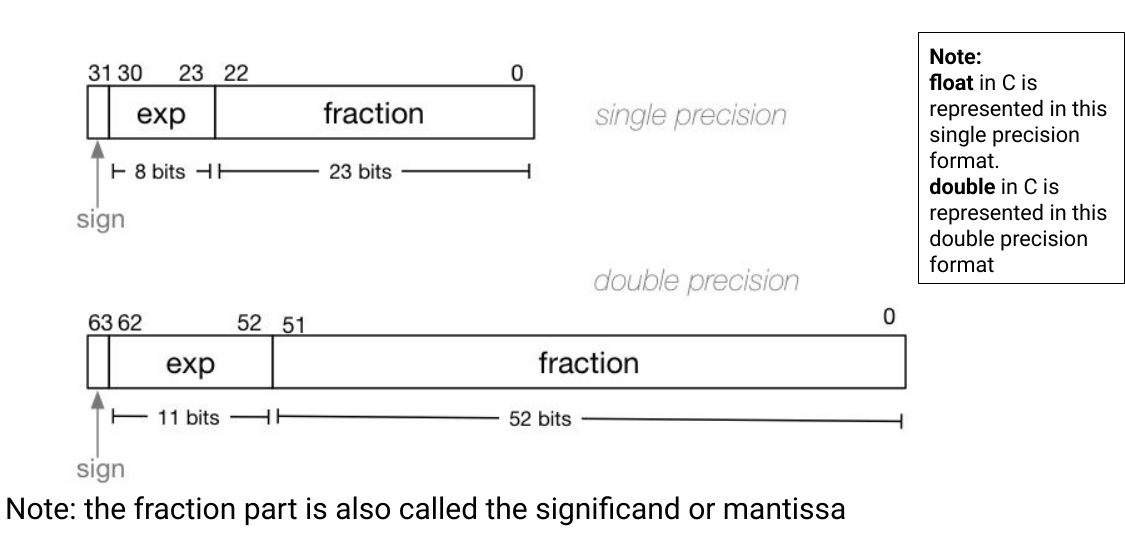
C commonly implements float using IEEE 754 binary32 and double using binary64:
| C type | Total bits | Sign | Exponent | Stored fraction | Exponent bias |
|---|---|---|---|---|---|
float |
32 | 1 | 8 | 23 | 127 |
double |
64 | 1 | 11 | 52 | 1023 |
For a normal value, the mathematical interpretation is:
where:
- is the sign bit;
- is the unsigned value of the stored exponent field;
- is the stored fractional bit string;
- the leading
1.is implicit and not stored.
The fraction is sometimes informally called the mantissa, although significand is the more precise term. For a normal binary32 value, 23 stored fraction bits plus the implicit leading 1 give 24 bits of precision.
The biased exponent#
The actual exponent may be negative, but the stored exponent field is treated as an unsigned integer. A bias shifts the desired range into non-negative field values:
For binary32, the bias is 127. An actual exponent of 3 is stored as .
Exponent fields 00000000 and 11111111 are reserved for special cases. Normal binary32 values therefore use stored exponents 1 through 254, corresponding to actual exponents -126 through 127.
Encoding a Float#
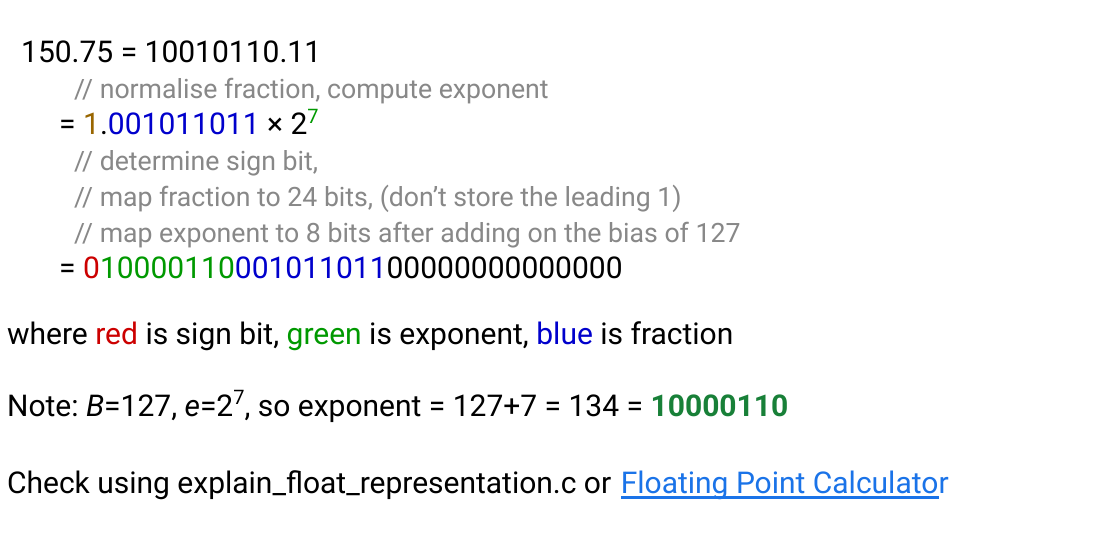
Let us encode 150.75 as a binary32 value.
1. Determine the sign#
The value is positive, so the sign bit is 0.
2. Convert the magnitude to binary#
150    = 10010110₂
0.75   = 0.11₂
150.75 = 10010110.11₂
3. Normalise#
10010110.11₂ = 1.001011011₂ × 2⁷
The actual exponent is therefore 7.
4. Bias the exponent#
5. Store the fraction#
Remove the implicit leading 1 and pad the remainder to 23 bits:
00101101100000000000000
6. Assemble the fields#
sign  exponent   fraction
0     10000110   00101101100000000000000
The complete pattern is:
01000011000101101100000000000000 = 0x4316C000
Decoding a Float#
Consider:
1 10000000 11000000000000000000000
- The sign bit is
1, so the result is negative. - The stored exponent is 128, so the actual exponent is .
- Restoring the implicit bit gives a significand of .
- The value is therefore .
The order matters: split the fields first, unbias the exponent, restore the implicit leading bit and only then evaluate the value.
Note
Checkpoint
- A normal IEEE 754 value stores a sign, a biased exponent, and a fraction with an implicit leading
1. - Encoding means normalising the binary magnitude and then placing each component into its field.
- Decoding reverses that process; keep the stored exponent separate from the true exponent.
Special Values#
The all-zero and all-one exponent patterns have meanings outside the normal formula.
| Exponent | Fraction | Meaning |
|---|---|---|
| all zeroes | all zeroes | positive or negative zero |
| all zeroes | non-zero | subnormal number |
| neither all zeroes nor all ones | any | normal finite number |
| all ones | all zeroes | positive or negative infinity |
| all ones | non-zero | NaN |
Positive and negative zero#
IEEE 754 has both +0 and -0. They compare equal, but the sign can affect later operations:
1.0 / 0.0   // +infinity
1.0 / -0.0  // -infinity
These results assume an implementation using IEC 60559/IEEE-754 floating-point semantics, as the CSE environment does. The ISO C language alone does not require every implementation to handle floating-point division by zero this way.
Subnormal numbers#
Normal numbers assume an implicit leading 1. Near zero, there is a gap between zero and the smallest normal value. Subnormal values use exponent field zero and an implicit leading 0 instead:
The purpose is gradual underflow. As results become too tiny for the normal format, precision is reduced step by step instead of every smaller non-zero result suddenly becoming zero. The exponent is held at its smallest scale while the fraction's leading 1 bits disappear. Subnormals are therefore less precise than nearby normal values, but they preserve useful information close to zero. The format details and their consequences are developed further in Oracle's Numerical Computation Guide.
Infinity#
An all-one exponent and zero fraction represent infinity. Infinity can arise when a finite operation overflows or when a non-zero finite number is divided by zero under IEEE floating-point behaviour.
double x = 1.0 / 0.0;

x + 1000.0       // infinity
42.0 < x         // true
x == INFINITY    // true
Infinity has a sign and generally propagates through sensible operations, although indeterminate expressions such as infinity - infinity produce NaN.
NaN#
An all-one exponent with a non-zero fraction represents NaN, or “not a number”. It represents invalid or indeterminate results such as 0.0 / 0.0.
NaN is unusual because comparisons involving it are unordered:
double x = 0.0 / 0.0;

x == x       // false
x < 10.0     // false
x > 10.0     // false
isnan(x)     // true
Do not test for NaN using x == NAN; use isnan from <math.h>.
Practice: Tracing / Calculation#
- Convert to binary.
- Encode
1.0as a binary32 bit pattern. - Decode
0 01111110 10000000000000000000000. - Explain why there are two zero encodings but only one normal encoding for each non-zero magnitude.
- What category is
0 11111111 00000000000000000000000? - What category is
0 00000000 00000000000000000000001?
Note
- Tracing / Calculation Answers
3. 1100.101₂.
4. 0 01111111 00000000000000000000000, or 0x3F800000.
5. The actual exponent is and the significand is 1.1₂ = 1.5, giving .
6. Normalisation fixes the leading digit and exponent, whilst zero uses a reserved exponent/fraction combination and retains a sign bit.
7. Positive infinity.
8. The smallest positive binary32 subnormal number.
Precision, Range and Spacing#
A binary32 exponent has enough range for finite normal magnitudes of roughly to , whilst binary64 extends roughly from to . This is vastly larger than same-sized integer types.
Range is not precision. A binary32 value has only 24 significant binary digits, corresponding to about 7 significant decimal digits. A binary64 value has 53 significant binary digits, corresponding to about 15 to 17 significant decimal digits.
Floating-point values are not evenly spaced. Within the interval , normal binary64 values have a constant spacing of:
When the exponent increases by one, the gap between adjacent values doubles. Near zero the values are extremely dense; at enormous magnitudes they are far apart.
flowchart TD
    I["Integers<br/>uniform gap = 1 everywhere"]
    B0["binary64 values in [1, 2)<br/>gap = 2^-52"]
    B1["binary64 values in [2, 4)<br/>gap = 2^-51"]
    B2["binary64 values in [4, 8)<br/>gap = 2^-50"]
    B3["binary64 values in [8, 16)<br/>gap = 2^-49"]

    I --> B0 --> B1 --> B2 --> B3
This diagram compares integer spacing with four consecutive positive binary64 exponent bins. The floating-point gap is constant within each bin, then doubles at the next power of two; the listed gaps are the real binary64 values, not a toy low-precision format.
When a + 1 == a#
Once a binary64 value is at least , the spacing between adjacent representable values is at least 2. There is no distinct double representing every neighbouring integer:
double a = 9007199254740992.0;  // 2^53
printf("%d\n", a + 1.0 == a);   // commonly 1
The exact mathematical result lies between representable values and rounds back to a.
Practice: Challenge#
- Binary32 has 24 bits of significand precision. Explain why
float a = 16777216.0f;may satisfya + 1.0f == a, and state the next representable value abovea.
Note
- Challenge Answer
16777216 is . In the bin , binary32 spacing is , so there is no representable value at . Round-to-nearest returns a; the next representable value is 16777218.0f.
Rounding Error#
When an exact result is not representable, it must be rounded. The usual IEEE 754 default is round to nearest, ties to even. This avoids a consistent upward or downward bias across many halfway cases.
Each individual error may be tiny, but errors can accumulate or be amplified by later calculations.
Worked example: a halfway result#
Around , adjacent binary32 values are two units apart. The integer 16777217 therefore lies exactly halfway between the representable values 16777216 and 16777218:
representable       exact input       representable
  16777216          16777217            16777218
      |------------------|------------------|
Round-to-nearest cannot choose by distance because both candidates are equally close. Ties to even chooses the candidate whose stored significand ends in 0, so converting 16777217 to binary32 produces 16777216. For the next halfway case, 16777219, the even candidate is 16777220. This alternation is what prevents every exact tie from consistently rounding in the same direction.
Decimal literals#
The source literal 0.1 is rounded to the closest available binary floating-point value. Consequently:
double x = 0.1 + 0.2;
printf("%.17f\n", x);  // often 0.30000000000000004
The display is not proof that arithmetic is broken. It exposes the nearest representable binary approximations used for the inputs and result.
Catastrophic cancellation#
Subtracting two nearly equal approximate values can remove their reliable leading digits and leave the rounding error dominant:
double a = 100000000000000.0;
double b = 100000000000001.0;
double difference = b - a;
This simple example may still behave as expected, but the general pattern becomes dangerous when both large operands already contain approximation error. Algebraically equivalent formulas can therefore have very different numerical stability. The course's particularly useful example is that, for small x, evaluating 1 - cos(x) subtracts two values extremely close to one. The identity below avoids that subtraction:
Both sides are mathematically equal, yet the second can retain far more useful precision near zero.
Order of operations#
Floating-point addition is not generally associative:
If a is enormous and b is tiny, a + b may round to a before c is considered. Rearranging a calculation can change the result because each intermediate step is separately rounded.
Note
Checkpoint
- Floating-point arithmetic rounds to the nearest representable value after each operation.
- Error depends on magnitude and operation order, so algebraically equivalent expressions may behave differently.
- Cancellation is especially dangerous when subtracting two nearly equal approximations.
Comparing Floating-Point Values#
Direct equality is appropriate when exact values are expected, such as checking a value you assigned directly or testing infinity. It is usually inappropriate for two independently calculated approximations.
A basic absolute tolerance comparison is:
#include <math.h>
#include <stdbool.h>

bool approximately_equal(double a, double b, double tolerance) {
    return fabs(a - b) <= tolerance;
}
An absolute tolerance alone behaves poorly across very different scales. A more general comparison combines absolute and relative tolerances:
bool nearly_equal(double a, double b) {
    const double absolute_tolerance = 1e-12;
    const double relative_tolerance = 1e-9;

    double difference = fabs(a - b);
    double scale = fmax(fabs(a), fabs(b));
    return difference <= fmax(
        absolute_tolerance,
        relative_tolerance * scale
    );
}
There is no universal tolerance. It must reflect the scale, accumulated error and consequences of the application.
Practice: Writing / Translation#
- Write the core expression for comparing two calculated
doublevalues using both an absolute and relative tolerance. Why is one fixed absolute tolerance insufficient?
Note
- Writing / Translation Answer
Compute difference = fabs(a - b) and scale = fmax(fabs(a), fabs(b)), then test difference <= fmax(abs_tol, rel_tol * scale). A fixed absolute tolerance can be too strict for enormous values and too loose near zero.
Why Floating Point is Poor for Money#
Many decimal monetary fractions, including 0.01, have no exact finite binary representation. Repeatedly adding rounded binary approximations can produce an unexpected final number of cents.
For simple fixed-currency calculations, store an integer count of the smallest required unit:
int64_t price_cents = 1999; // $19.99Financial systems may instead use decimal floating-point or arbitrary-precision decimal types, particularly when regulations prescribe rounding rules. The important point is not merely “use more bits”; it is to use a representation whose base and rounding model match the problem.
Practice: Cumulative#
- A program repeatedly adds
0.01to adoubleand expects the result to be an exact number of cents. Explain the representation problem, then give a representation for prices up to ten million dollars with exact cent precision. - Without evaluating it in C, classify each result as finite, infinity or NaN under IEEE-754 behaviour:
1.0 / 0.0,0.0 / 0.0,INFINITY + 5.0, andINFINITY - INFINITY.
Note
- Cumulative Answers
11. 0.01 has no finite binary expansion, so each stored value is a rounded approximation and repeated operations can accumulate visible error. Store an integer number of cents, such as int64_t cents; ten million dollars is one billion cents, comfortably within that type.
12. 1.0 / 0.0 is positive infinity; 0.0 / 0.0 is NaN; adding a finite value to infinity remains infinity; subtracting infinity from itself is indeterminate and produces NaN.
Floating point shows the consequences of representing an unbounded mathematical idea using finite machine state. Operating Systems addresses a different problem: how programs safely share the machine which performs those calculations.